Showit for Photographers: What I Like, What to Know, and How I Use It
February 19, 2025
Originally published · Updated
If you’re researching Showit for photographers, you’ve probably seen plenty of beautiful websites built on it.
That’s part of what originally appealed to me too.
But after actually using Showit through multiple versions of my photography business — changing services, rebuilding pages, moving markets, maintaining a WordPress blog, working on SEO, and making approximately four million tiny website edits because apparently that is one of my hobbies now — what I value most isn’t simply that it can make a pretty website.
It’s that I can keep changing the site myself as my business changes.
That distinction matters.
Showit has been a very good fit for my photography business, but I don’t think every website platform is automatically right for every photographer. So rather than telling you it’s the “best website builder” and calling it a day, I want to show you what I actually like, how I use it, and a few things I think photographers should understand before switching.
Disclosure: This article includes my Showit referral link. New customers who subscribe through my link receive one free month of Showit, and I receive Showit subscription credit too. I recommend Showit because it’s the platform I actually use for my own photography website.
What Is Showit?
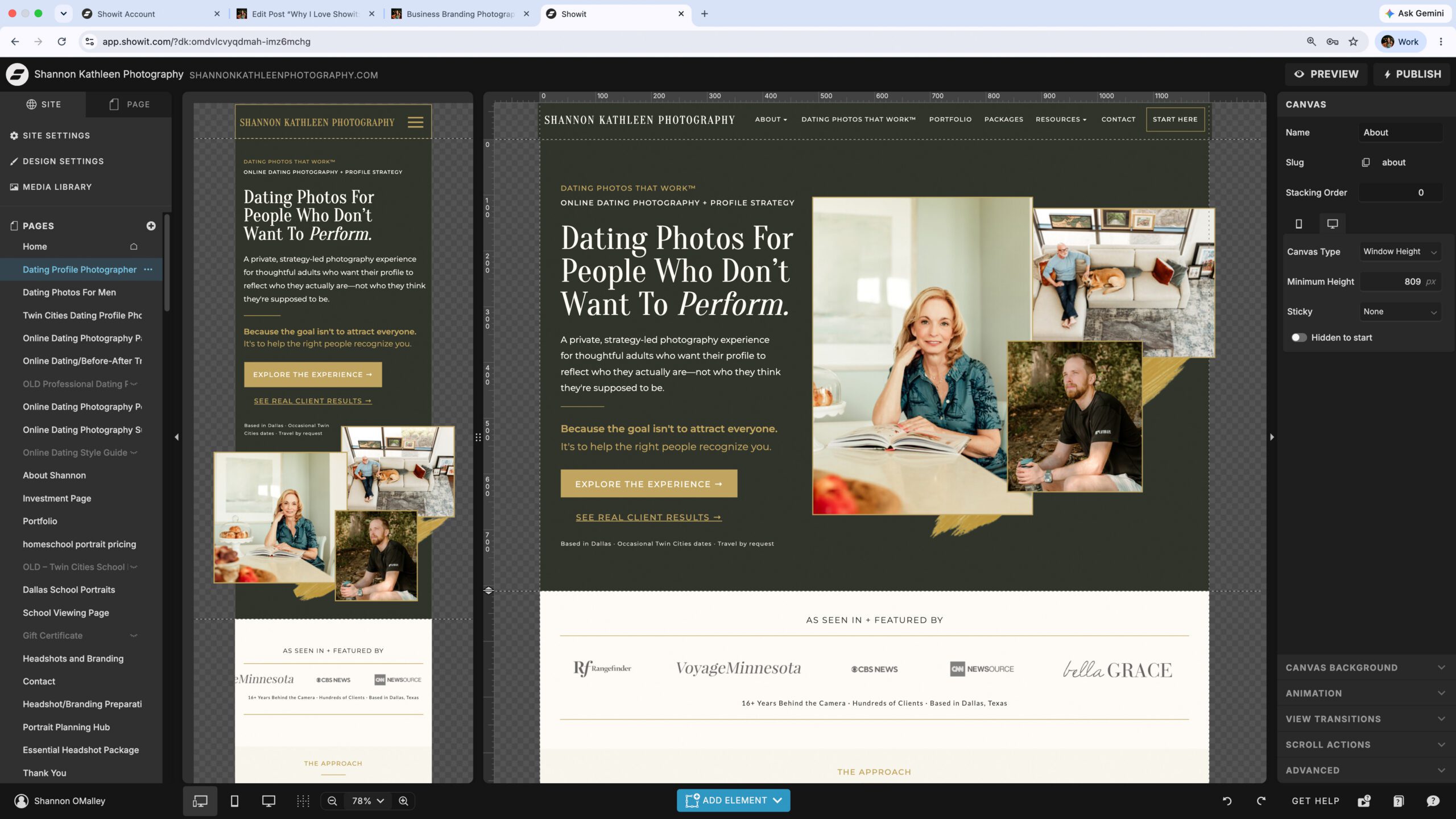
Showit is a visual drag-and-drop website builder designed to give you considerable control over how pages look without requiring you to build the site through code.
For photographers, that means images don’t have to squeeze themselves into a rigid layout simply because a template decided that’s where they belong.
You can control positioning, typography, image placement, canvases, buttons and other visual elements directly inside the design app. Showit describes the platform as a no-code visual builder, and its current plans range from website-only hosting to options that add a WordPress-powered blog. (Showit’s overview)
That combination — visual design in Showit and blogging through WordPress when you choose a blog plan — is a big part of why the platform has continued to work for me.
Why I Still Use It
My website has changed as my business has changed.
I haven’t needed a new platform every time.
Why Showit for Photographers Makes Sense to Me
Photography is visual.
That sounds painfully obvious, but it has practical implications when you’re building a website.
I want control over the relationship between my photographs and the text around them. I want to decide how large an image should feel, how much white space belongs around it, whether a photograph should run wide across a page, and how one section flows visually into another.
Showit gives me much more freedom to make those decisions myself.
Templates are available if you want a starting point, but you aren’t locked into keeping them exactly as designed. I can move, resize, restyle and restructure things as my website evolves.
That flexibility is one of the main reasons Showit for photographers has continued to make sense for my own business.
For a business like mine — where photography is part of both the service and the visual experience of the brand — that flexibility has mattered a lot.

How Showit for Photographers Handles Desktop + Mobile
This is both one of my favorite Showit features and something you need to understand before choosing it.
Showit allows many aspects of the desktop and mobile layouts to be adjusted independently. Elements can be repositioned, settings can be split between devices, and some elements or entire canvases can even be shown on one layout and hidden on another. (Showit mobile and desktop design guide)
That gives me a lot of visual control.
An arrangement that looks fantastic across a large desktop monitor may need different spacing, sizing or positioning on a phone. Rather than relying entirely on an automatically generated mobile version, I can fine-tune the experience.
But there’s another side to that freedom:
you actually need to look at the mobile version.
I have absolutely made a desktop change, admired my work, and then discovered that something on mobile needed its own adjustment.
So I wouldn’t sell this feature as:
“Everything automatically looks perfect on every device.”
It doesn’t.
I’d describe it as:
You have more control over how each version looks — which also means you have some responsibility for checking both.
For me, that tradeoff is worth it.
How Blogging Works With Showit for Photographers
This is one of the things that can confuse people who are new to Showit.
You design your main website in Showit.
If you choose one of Showit’s blog plans, your blog content itself is powered by WordPress while the design of the blog templates is created through Showit. Showit currently offers a Basic Starter Blog tier as well as Advanced Blog options; the Basic plan uses a set of preinstalled WordPress plugins, while the Advanced plan allows broader plugin access and additional WordPress functionality. (Showit plan guide)
That means I can have the visual design flexibility I like on the front end while still writing and managing blog posts through WordPress.
If you’re reading this article on my site, that’s exactly what is happening.
The article itself lives in WordPress.
The larger visual experience around it was designed through Showit.
That setup has worked well for me because blogging is a meaningful part of my search strategy, not simply an archive of old sessions.
How My Site Works
Showit
Where I design the visual pages, layouts, mobile experience, typography and overall site structure.
WordPress
Where I write, edit and manage the blog content that appears inside my Showit-designed blog templates.
SEO + Showit for Photographers: What Actually Matters
This is where I want to be particularly clear.
Choosing Showit does not make a website rank on Google.
Neither does choosing WordPress, Squarespace, Wix or any other platform.
A platform can give you tools and technical capabilities, but SEO still depends on what you do with them.
Showit lets users set things such as page titles and meta descriptions, structure page text with heading tags, and add image titles and alt descriptions. Showit’s own documentation also warns against keyword-saturating image alt text, which happens to be advice I strongly agree with. (Showit SEO tools) (Showit image SEO guidance)
On my own website, SEO involves much more than checking a box inside the platform.
I work on:
- useful page content
- search intent
- titles and meta descriptions
- internal linking
- image descriptions
- page structure
- redirects when content moves
- blog strategy
- updating old information
- Google Search Console data
The platform gives me places to implement those decisions.
It doesn’t make the decisions for me.
And that is a distinction I wish more “best website builder for SEO” articles made.
Worth Knowing
Your website platform is not your SEO strategy.
Showit gives me useful control over important on-page elements, but rankings still depend on content, structure, relevance, technical health, links, and the experience the site creates for actual people.
A Current Showit Update I’m Watching in 2026
One reason I wanted to update this article rather than leave my older Showit review sitting untouched is that the platform itself keeps changing.
In August 2026, Showit made its Beta Publish Engine available as an optional update.
According to Showit, the new publishing engine is designed to improve page loading and rendering, accessibility and screen-reader structure, publishing speed on larger sites, and the way site content is structured for search engines and AI systems. (Showit Publish Engine update)
The important word there is beta.
As of this update, Showit recommends previewing the site carefully before switching an existing design to the new engine, particularly when custom code is involved.
I like seeing technical improvements happening behind the scenes, especially when they involve accessibility and HTML structure.
But I also don’t think photographers need to chase every platform update the moment it appears.
Test.
Preview.
Make sure your actual site still works.
Then publish.
Not nearly as exciting as “CLICK THIS BUTTON AND DOMINATE GOOGLE,” I know.
But considerably more useful.
What I Like Most About Showit After Actually Using It
The design freedom is the obvious answer, but I think the larger benefit is that I can keep working on my own website.
When I need to change a page, add a new service, adjust navigation, rebuild a section, swap photographs or change the hierarchy of a page, I usually don’t have to wait for a developer to do it for me.
That matters because my business has not stood still.
My photography work has changed.
My positioning has changed.
I moved from Minnesota to Dallas.
My site now needs to serve Dallas–Fort Worth year-round while still supporting select Twin Cities dates and travel.
I’ve built out my Dating Photos That Work™ hub, changed offers, added profile strategy, updated my branding photography services, and continually refined the way the site connects all of those pieces.
A website platform that only worked for the version of my business I had when I first built it would be frustrating.
Showit has given me enough flexibility to keep evolving it.

What I Don’t Love About Showit
A useful review should include this part.
Showit is flexible, but flexibility can create its own kind of work.
There is a learning curve.
Drag-and-drop does not mean “I understood the entire platform in twelve minutes.”
You still need to learn canvases, site canvases, layers, mobile settings, design settings, blog templates and the logic of how everything fits together.
Mobile deserves its own attention.
The independent control I mentioned earlier is useful, but it also means a change that works beautifully on desktop can occasionally need cleanup on mobile.
Blogging adds another system.
If you use a Showit blog plan, you’re also working inside WordPress. I personally like the combination, but someone looking for absolutely everything inside one interface should know that going in.
Design freedom can encourage overdesigning.
Just because you can move everything everywhere doesn’t mean you should.
A website still needs hierarchy, readability, navigation and a clear path toward whatever you want the visitor to do next.
And yes, I have absolutely rearranged something because I could, only to later realize the first version was better.
Occupational hazard.
What I Like
Visual freedom, image-forward layouts, separate desktop and mobile control, WordPress blogging options, and the ability to keep updating my own site as my business changes.
What to Know
There is still a learning curve. Mobile needs attention, blogging adds WordPress to the workflow, and having design freedom doesn’t replace strategy, usability, or SEO work.
Is Showit for Photographers Right for Every Business?
For my photography business, yes.
That’s different from saying every photographer on earth should use it.
I think Showit is particularly worth considering if you:
- care deeply about how your photography is presented
- want substantial control over page design
- like being able to make your own website changes
- want a WordPress blog without building your entire visual website directly in WordPress
- are willing to learn the platform rather than expecting every decision to happen automatically
Someone who wants the simplest possible all-in-one experience with very few design decisions may prefer something else.
Someone who wants a highly custom web application with complex technical functionality may also need something beyond the typical Showit setup.
The right platform depends on the business.
For me, Showit has continued to hit a useful middle ground between visual freedom and something I can actually maintain myself.
How Much Does Showit Cost?
I intentionally don’t want to hard-code a pricing chart into this article because platform pricing changes.
Showit currently has website-only, Basic Starter Blog and Advanced Blog options, along with plans for higher-traffic blogs. The best plan depends largely on whether you need a blog and how much WordPress functionality you require.
If you’re comparing plans, use Showit’s current pricing page rather than relying on an old blog post — including mine.
Yes, I appreciate the irony of writing that in a blog post.
How My Showit Referral Link Works
Showit has its own trial options, but there’s a separate benefit when you subscribe through my referral link.
New Showit customers who subscribe through my link receive one free month of Showit.
I benefit too: Showit gives me a month of subscription credit when a qualifying referral subscribes.
That’s why I want the relationship to be completely clear. This isn’t a special version of Showit or a separate product I’m selling. It’s simply my referral link to the same platform I use for Shannon Kathleen Photography.
If you’ve been considering Showit, using the referral link means you get the free month and I receive credit for referring you.
Want to Try Showit?
See How It Feels Before You Commit
Showit currently offers a 14-day free trial with no credit card required. If you decide to subscribe through my referral link, Showit also provides a free-month referral benefit for qualifying new subscribers.
Try Showit →Referral disclosure: If you later subscribe through my link, I may receive Showit referral credit at no additional cost to you.
Showit for Photographers: Frequently Asked Questions
No coding knowledge is required for the normal visual building experience.
Showit is built around a drag-and-drop design interface. More advanced users can incorporate custom code, but that isn’t necessary simply to build and maintain a standard photography website.
If you choose a Showit plan that includes blogging, the blog is powered by WordPress while the blog-template design is created in Showit.
The website-only Showit plan does not include a blog.
Showit provides controls for important on-page elements including page titles, meta descriptions, heading structure and image descriptions. Its blog options also use WordPress.
But I would never choose a website platform expecting the platform itself to create rankings.
SEO still requires good content, clear structure, relevance, internal linking, technical maintenance and an understanding of what your audience is actually searching for.
Showit provides separate control over many desktop and mobile design settings, and you can preview and edit both versions side by side. (Showit mobile design guide)
That flexibility is valuable, but it also means I recommend checking both layouts whenever you’re making meaningful design changes.
Yes.
Showit offers templates as starting points, and there are additional templates available through outside designers. The advantage is that the layout can be customized rather than requiring you to keep the original design exactly as it was.
Yes. Showit offers a trial so you can explore the platform before deciding whether it fits your business. Separately, new customers who subscribe through my referral link receive one free month of Showit.
New Showit customers who subscribe through my referral link receive one free month of Showit. Showit gives me one month of subscription credit too, so the referral benefits both of us.
I benefit if you subscribe through my link, which is why I disclose that relationship clearly.
No website platform is automatically right for everyone.
I recommend looking at how much design control you want, whether you plan to blog, how comfortable you are maintaining your own site, and what functionality your particular business needs.
For the way I work, Showit has been a very good fit.
The Biggest Reason I Still Use Showit
My answer isn’t really:
Because it makes beautiful websites.
Lots of platforms can make beautiful websites.
I still use Showit because I have been able to keep changing my website as my business changes.
That’s been especially valuable in a photography business where my portfolio evolves, my services evolve, the markets I serve change, and the language I use to explain my work keeps getting more specific.
My website is not finished.
I don’t particularly want it to be.
It needs to keep doing its job as the business changes.
Showit gives me enough control to keep shaping it without making me rebuild the entire thing from scratch every time I have a new idea.
And for me, that’s the feature that has mattered most.
If you decide Showit feels like the right fit for your own business, you can use my referral link below to receive one free month of Showit when you subscribe.
My Showit Referral Link
Get a Free Month of Showit
New Showit customers who subscribe through my referral link receive one free month of Showit. I receive a month of subscription credit too.
Get a Free Month of Showit →Referral disclosure: Showit gives me subscription credit when qualifying customers subscribe through my link.

Dallas-based dating profile photographer + profile strategist and founder of Shannon Kathleen Photography, creator of Dating Photos That Work™. Shannon specializes in dating profile photography, visual first impressions, photo strategy, photo selection and order, and natural portraiture designed to feel current and genuinely representative of the person being photographed.
Her work has been featured by CBS/WCCO, CNN Newsource, Bella Grace Magazine, Rangefinder, and other media outlets. She serves Dallas–Fort Worth year-round, with occasional Twin Cities dates + travel by request.
More About Shannon →